- 1Verify code
- 2Submit SSO
- 3View result
Verify your code
Plus, Premium, Super or Ultra, each for 1 month. Verification will show your plan.
Grok, Cursor, X and Grok Bot benefits vary by plan. X benefits require linking your personal account; follow your purchased plan’s instructions. Plus / Premium / Super / Ultra · 1 month each
Where can I find my Grok SSO?
Use a desktop browser and sign in to the Grok account you want to activate.
- 01
Sign in to your account
Open grok.com and sign in to the account you want to activate.
- 02
Open Developer Tools
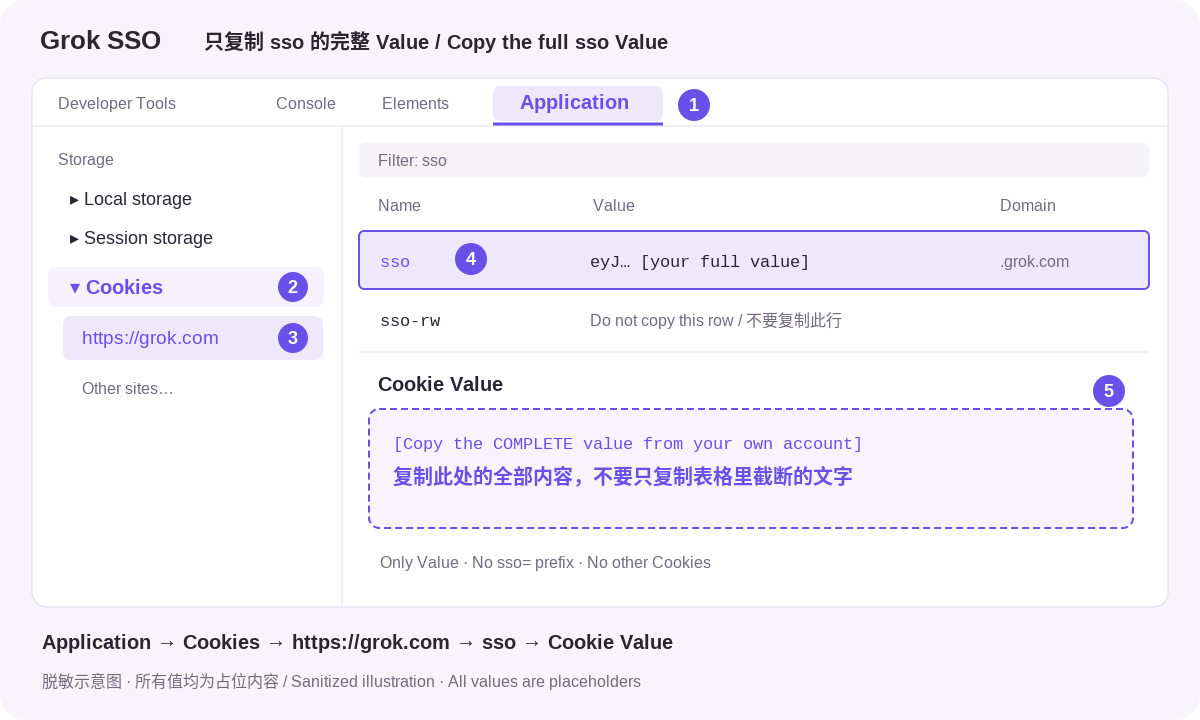
Press F12, Ctrl + Shift + I on Windows, or ⌘ + ⌥ + I on Mac. Choose Application; use » if the tab is hidden.
- 03
Find sso
Under Storage, expand Cookies and select https://grok.com. Find the row named exactly sso, not sso-rw.
- 04
Copy the full Value
Select sso and copy the entire Cookie Value shown below. Paste only that value here, without sso=, quotation marks or other Cookies.
Use a computer to get your SSO, then return here to submit it.
SSO use and session management
SSO can grant access to your Grok account. It is sent over an encrypted connection to the activation service, held temporarily and used by an operator to sign in and process activation. This website does not put SSO in logs or browser storage. Submit only if you trust this service.
Never send SSO in support chats or post it publicly. After processing completes, review sign-in sessions in your Grok account’s security settings and sign out of the session used here to revoke its access. Available controls depend on your account.
Before you redeem
Which redemption channel should I use?
This page accepts X Bundle codes only. For legacy Grok / SuperGrok or ChatGPT, choose the matching channel above. Verification identifies your plan and duration.
Can I redeem on my phone?
You can submit on a phone, but a desktop browser is recommended for getting your Grok SSO. Transfer it securely between your own devices; never send it to support.
What if activation is not immediate?
Acceptance does not confirm activation. This page checks progress automatically. After a timeout or network error, follow the instructions to query or retry the same submission. Do not create a duplicate order.